Quotes and Proposals

Telecoms Quotes and Proposals

Quote from real prices, offer options side by side, and let the customer accept in a browser.

The quote is the billing record

For most resellers, quoting and billing are two separate jobs. The quote is put together by hand, in whatever tool suits, and sent to the customer. If they say yes, someone keys the same details into the billing system all over again.

Here the quote is made of real product records. Every line is a number, service or feature carrying your actual tariff. Totals are worked out by the billing engine, so the quote cannot say one thing while the first invoice says another.

When the customer accepts, those same records go live on the date you choose. There is nothing to type up afterwards.

Deals, quotes and proposals

Three words that sound alike and mean different things. Here is the short version.

The deal is yours

Your record of the opportunity. It holds the products, your buy costs and the margin. The customer never sees it.

The quote is theirs

The priced offer built from that deal. Same products, your sell prices only. Costs and margin stay behind.

The proposal is the delivery

What lands in their inbox. One private link and one PDF, opened in a browser and accepted there.

Offering a choice means a second deal, not a second quote on the first one. Each option is its own deal with its own quote. They still go out as one proposal. The customer picks one and the rest close as alternatives, so your win rate stays honest.

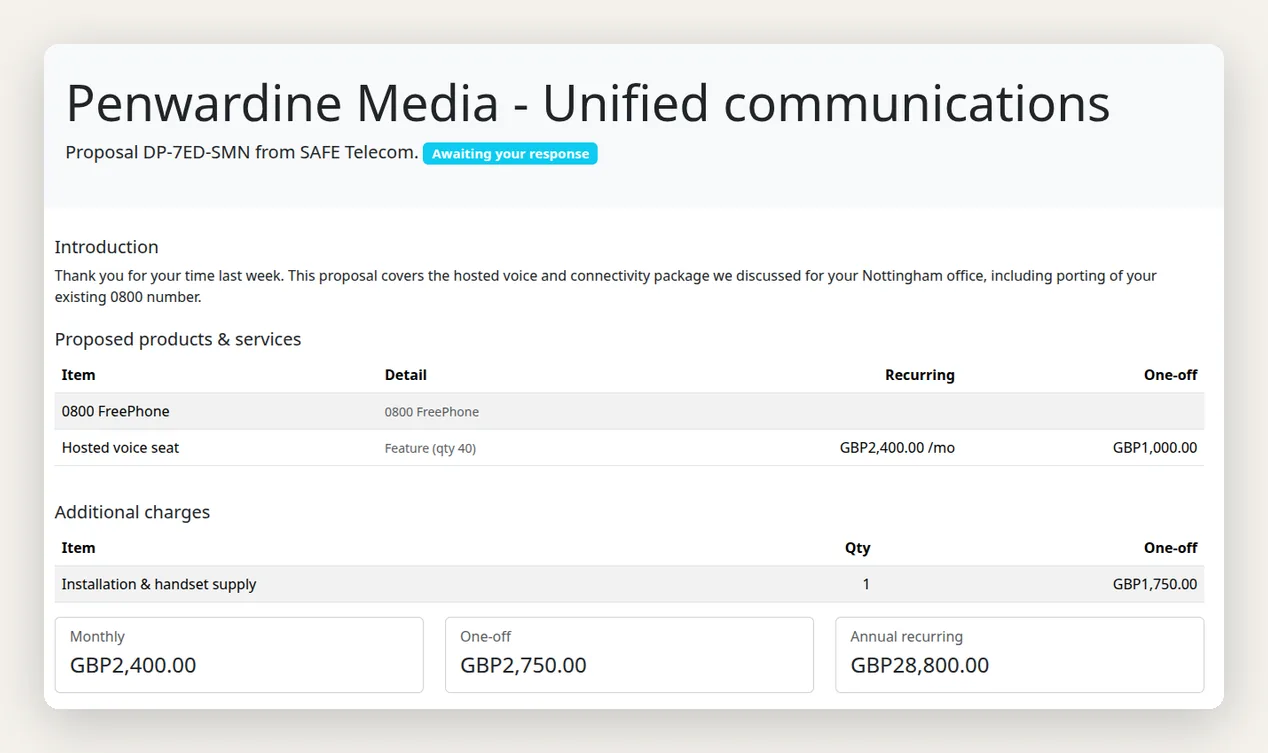
The proposal a customer sees in their browser: an itemised list of proposed products and services with recurring and one-off prices, and summary boxes for the monthly, one-off and annual totals

Good, better, best in one proposal

Giving a customer a single price invites a yes or a no. Giving them a choice changes the question to which one. Any deal can carry alternative options, each its own deal, each fully priced.

Build them quickly

Clone the main deal and adjust it, or start from a package. Each option gets a short note explaining who it suits.

Send them as one

One proposal, one PDF, one link. The customer sees an option switcher and compares the totals side by side.

Keep the figures honest

Deals the customer did not pick close as alternatives, not losses, so your win rate and forecast stay accurate.

Beat the bill they already have

Telecoms deals are usually won on the comparison, not the price list. SAFE CRM lets you record what the prospect pays today and show the difference in black and white.

  • Capture their current spend: as one monthly figure, split by inbound, national, mobile and international, or reconciled from a bill they send you.
  • Model expected usage: one shared minutes profile covers the deal, and each option sets its own included minutes and rates.
  • Show the saving per option: monthly and across the full term, so a longer commitment can be justified on the page.
  • Keep your costs private: buy rates, cost and profit are used in your own margin figures and never appear on anything the customer receives.

Because the same figures feed your margin view, you can see what a deal is worth to you while you are still deciding how hard to sharpen the pencil.

From sent to signed

PDF and web, in step

The customer gets a branded PDF for their records and a web page with the same itemised detail. The PDF stays as the snapshot of what was offered.

No login needed

A private link opens the proposal directly. Customers who use your portal can accept from there instead.

Authority confirmed

The person accepting types their name and can be required to confirm they are authorised to accept for the company. You choose whether that is required, optional or off.

Confirmation document

Acceptance produces a downloadable confirmation recording who accepted what, and when. Declines are recorded with the same detail.

Questions stay with the deal

Customers can ask a question straight from the proposal. It reaches the deal owner and the thread is kept against the deal, not buried in an inbox.

Expiry handled

Proposals expire on their own. The deal unlocks, the pricing is free to change, and the rep is prompted to re-issue rather than let it drift.

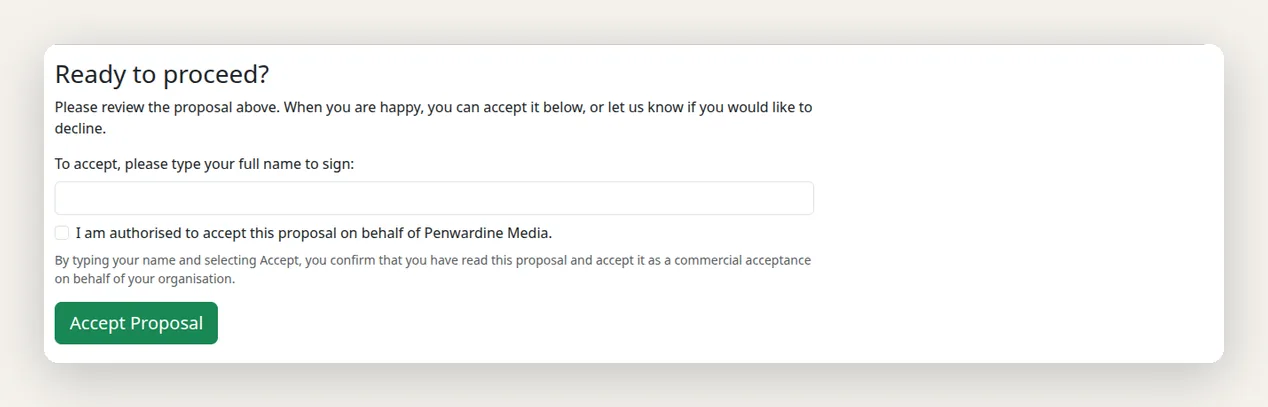
The acceptance step of a SAFE CRM proposal, where the customer types their full name to sign and ticks a box confirming they are authorised to accept on behalf of their company

Packages and premium numbers

Most resellers sell the same handful of shapes over and over. Packages let you define those once: a bundle of numbers, services, features and one-off charges with prices already set. Applying a package to a deal builds every record in one step, and a rep can still adjust anything afterwards.

If you hold memorable or premium numbers, they can be kept as a proper inventory with suggested prices. Offering one onto a deal reserves it for that customer straight away, so two reps cannot sell the same number twice. Win the deal and it is marked sold. Lose it and the number returns to stock.

Quoting Questions and Key Terms

What is the difference between a deal, a quote and a proposal?
A deal is your own record of the opportunity, including your buy costs and margin. A quote is the priced offer built from it, showing your sell prices only. A proposal is how a quote reaches the customer: a private link and a PDF. If you offer a choice, each option is a separate deal with its own quote, and they go out together as one proposal. The customer picks one and the rest close as alternatives.
How does a customer accept a proposal?
They get a private link by email, open the proposal in a browser, and accept it there. No login is needed, and no printer either. Customers with a portal account can accept from inside the portal instead. Either way the acceptance is recorded with a timestamp, the name typed, and the address it came from.
Can I offer more than one option in a proposal?
Yes. Each option is its own deal, with its own products, its own pricing and a short note explaining why a customer might prefer it. They are linked as alternatives and go out as one proposal with an option switcher. The customer picks exactly one. The other deals close automatically, marked as an alternative rather than a loss, so they never distort your win rate.
Can I show a customer what they would save?
Yes. You can record what the customer pays their current supplier, either as a single monthly figure, broken down by call category, or reconciled from a bill. The proposal then shows the monthly and full-term saving for each option. Your buy rates and margin are never included in anything the customer sees.
What is a package?
A package is a reusable bundle of numbers, services, features and one-off charges with prices already set. Applying one to a deal creates all the individual records in a single step. Reps can then fine-tune anything on the deal. It saves rebuilding the same standard offer from scratch every time.
Does the quote lock while the customer has it?
Yes. Once a proposal is sent, the deal freezes so nobody edits the prices underneath the customer. If you offered alternatives, every deal in the group freezes together. Withdrawing, declining, closing or letting it expire releases the lock again.
Can I require sign-off before a discount goes out?
Yes. Quotes can require manager approval before they can be sent, and approval is bound to the pricing at the moment it was given. If someone changes the numbers afterwards, the approval is void and has to be sought again.
Is an online acceptance legally sound?
It records who accepted, what they accepted, when, and from where, and can require the person to confirm they are authorised to sign for the company. That evidence is stronger than most emailed purchase orders. It is not a qualified electronic signature under the Electronic Communications Act 2000, so if your contracts need one, keep using your existing e-signature provider for the contract itself.
Can customers ask questions about a proposal?
Yes. There is an "ask a question" option on the proposal page. The question is attached to the deal and the salesperson is notified. Replies happen on the web rather than by email thread, so the whole exchange stays with the deal instead of in someone's inbox.
What does CPQ mean?
CPQ (configure, price, quote) is software that helps a salesperson assemble a valid combination of products, price it correctly, and produce a quote. In telecoms the pricing part is the hard bit, because tariffs, bundles and usage all interact.
Next step

Send a Quote in Minutes

Book a demo and we will build one of your standard offers as a package, then send it as a proposal with options.