
Sales Sequences for Telecoms Teams
Give repeatable sales follow-up a clear schedule, while retaining the context for a personal response.
Coordinate follow-up around the opportunity
A reseller’s follow-up can include an initial email, a qualification call and a later proposal discussion. SAFE CRM sequences arrange repeatable steps around the deal so that the next action does not depend on a separate reminder list.
Use them where the sequence of work is predictable. A complex service enquiry still needs a person to adapt the conversation to the customer’s requirements and delivery constraints.
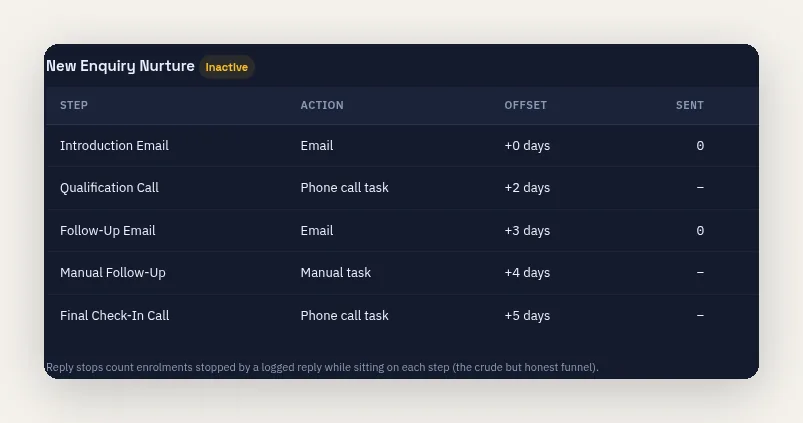
Combine messages and assigned tasks
A sequence can contain email and task-based steps, with delays between them. Calls and manual follow-up remain work for the assigned person; creating a task does not mean the customer has been contacted.
Templates provide consistency, but should carry enough context for the recipient to understand the enquiry or offer. Avoid treating a generic sequence as a substitute for checking what the customer has already said.
Respond when the conversation changes
Stop conditions let the sequence end when the relevant reply or deal event is recorded. Inbound email handling can stop active deal follow-up when a recognised reply is matched to the conversation.
This depends on the event reaching the system and being associated correctly. A response received through another channel needs to be recorded, so the next scheduled step does not proceed on an outdated assumption.
Keep sales follow-up separate from debt collection
Sales sequences organise opportunity-related contact. Credit Control uses its own invoice-based stages, eligibility checks, holds and approval controls for overdue accounts.
The distinction matters where the same customer has an open opportunity and an unresolved payment issue. Review the customer context before starting a sequence and keep the purpose of each communication clear.
Review the sequence before wider use
Start with a representative opportunity and check the timing, task ownership, message content and stop conditions. Confirm how a reply from the customer’s usual contact reaches the record.
Sequences sit within the Scale feature set and require the relevant workspace permissions and email setup. CRM pricing explains the tier structure.
Related CRM workflows
Questions about sales sequences for telecoms teams
Does every step send an email?
Will a reply always stop the sequence?
Can sequences collect overdue invoices?
Which tier includes sequences?
Plan Your Sales Follow-Up
Work through a representative enquiry, including the email steps, assigned tasks and customer reply that ends the sequence.